Record work rights and visa hour limits
A student visa with a fortnightly cap is easy to go over by accident on a busy week. Recording it lets the roster say so while you are still building the week.
Open the person from Team, then Details. Right to work is its own card. The person can fill in the same thing themselves on their phone, under More, then Work rights.
Open Right to work
Set the status to what the person has shown you. Everything else on the card follows from it: a visa asks Which visa? and Visa expires.
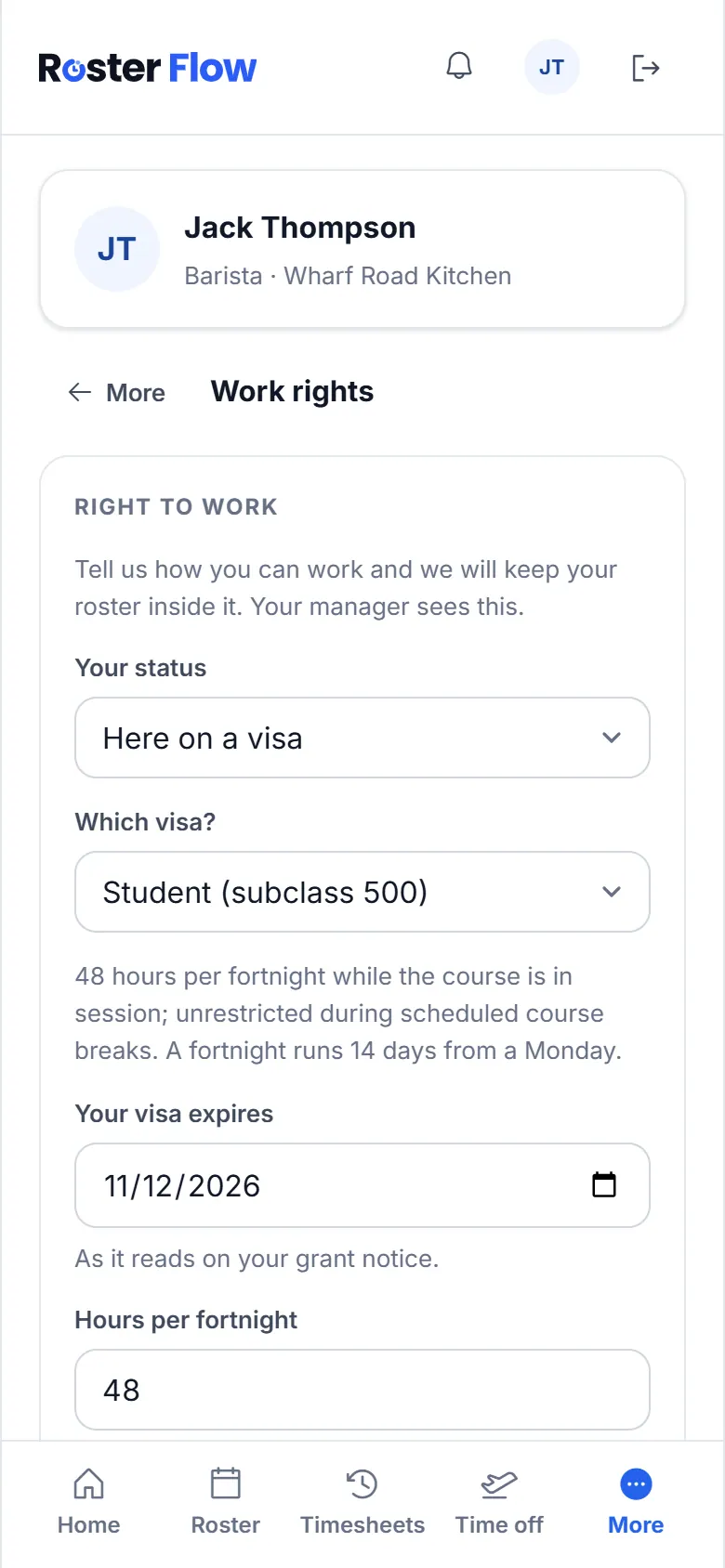
The same card the employee sees on their phone. Set a cap, where there is one
Hours per fortnight is the limit, or No limit where none applies. Until records a date the cap lifts, such as the end of a study period.
Note anything the fields do not cover
Anything else is free text for the detail that does not fit a box, such as when a course finishes. The person sees what you record, and you see what they record.
What the roster does with it
- Over a visa work limit warns while you are building a week that goes past the fortnightly cap recorded for somebody.
- Visa expiry warns when a recorded visa runs out inside the week, or has already passed.
- Reports has an Export visa caps for the period, beside the long weeks it lists under the same heading.
Every one of these warns and none of them refuses. A shift can always be rostered, because the roster is not the place to adjudicate somebody’s immigration status.
What this is not
The card says so itself, under This is a record, not a check: conditions are individual, only the visa grant notice and VEVO are authoritative, and nothing here is immigration advice. Roster Flow holds what the business was told and warns when a roster looks like it goes past it.
Questions
Does Roster Flow check somebody’s visa?
No. It records what the business was told and warns when a roster looks like it goes past that. Only the visa grant notice and VEVO are authoritative, and Roster Flow is not immigration advice.
Will a shift be blocked when it goes over a recorded cap?
No. The roster warns with Over a visa work limit and the shift can still be saved. Nothing in Roster Flow refuses a shift on these grounds.
Can the employee record their own work rights?
Yes, under More, then Work rights in the staff app. The manager sees what they record and can change it, and the screen tells the employee their manager sees it.
Why does the roster warn about a visa that has already expired?
Because the recorded expiry has passed and nobody has updated it. It is a prompt to ask the person for current evidence, not a conclusion about their status.
Next
Still stuck? Tell us what you were trying to do and which screen you were on.