Send an offer letter
An offer is a question, so Roster Flow sends it on its own and holds the rest back. This covers putting your business at the top of the letter, sending it, and deciding who sends what follows.
The letter is built from what is already on the staff record: position, employment type, pay rate, start date and venue. Nothing is typed twice, which is also why the rate in the letter cannot drift away from the rate payroll is told.
Put your business at the top of it
A letter of offer with nobody’s name on it reads as a draft. The company header is set once, in one place, and goes on every offer, policy and statement you send afterwards.
Open Settings, then Access
Under the business details is Your company header. The preview at the top of it is the real thing: whatever it shows is exactly what a document will carry.
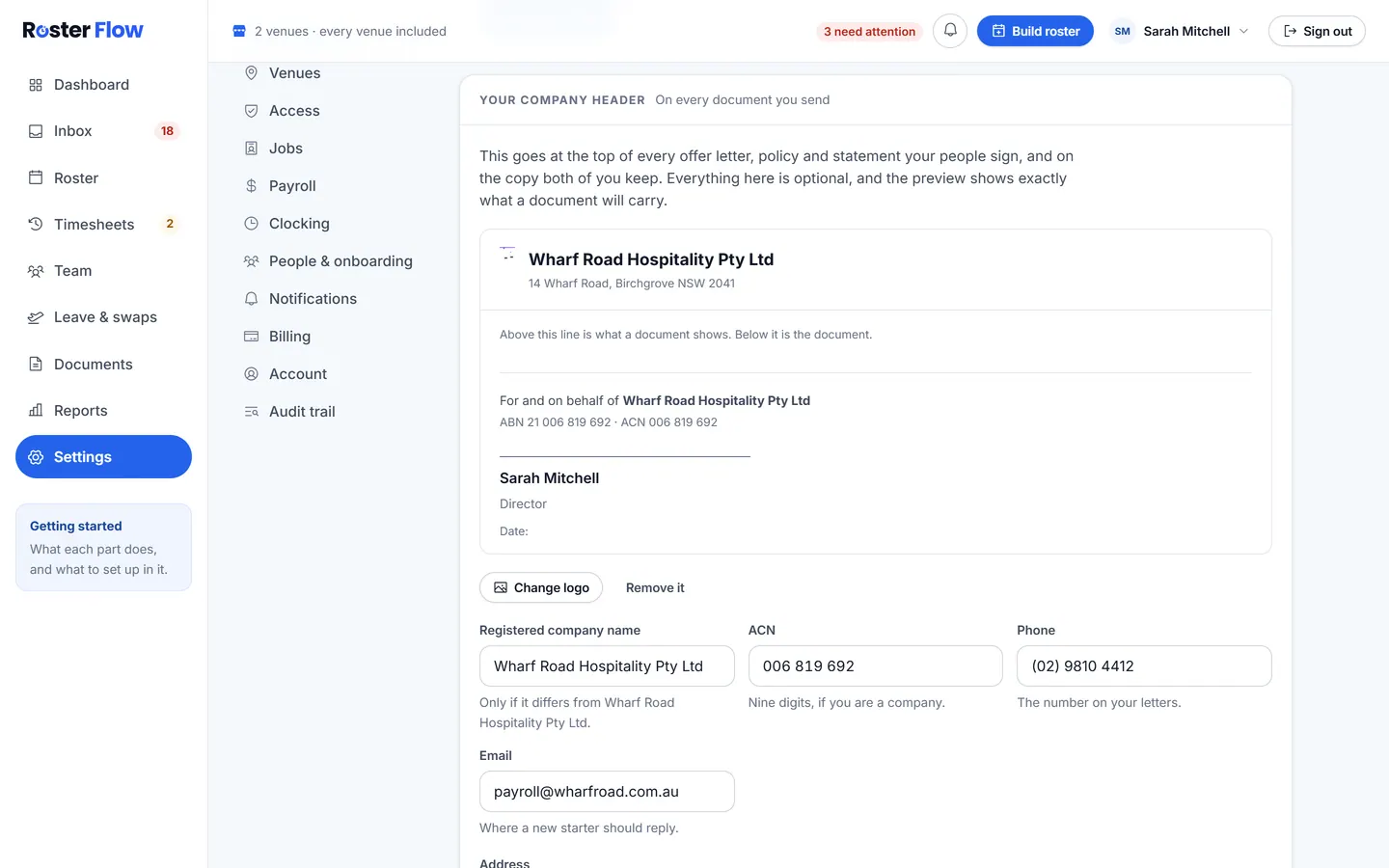
Settings, then Business. The preview is the header itself, not a picture of one. Add the logo and the details
Change logo takes a PNG, JPEG, WebP or SVG under 300 KB. Fill in Registered company name only where it differs from your trading name, then ACN, Phone, Email and Address as you want them written.
Name your directors
Add a director for each one. They are named on the header, which is a different question from who signs a letter: Who issues your offers at the bottom is the name an offer is signed under, and it can be a venue manager who is not a director.
Press Save company header
Documents already sent keep the header they went out with. Changing this only affects the next one.
Set how long probation runs
How long somebody is on probation is a term of the job rather than a fact about the business, so it sits with the rest of what a new starter arrives on rather than in the document library. In Settings, under People & onboarding, Probation takes a number of months and every offer states it. Left blank the letter asks you when you send one, rather than stating a term nobody chose.
Decide what follows an accepted offer
The Documents tab carries the one setting about timing, under After an offer is accepted. A signed copy of the offer always reaches both sides by email; this is only about the policies and the details form that come next.
- Send them straight away puts the policies and the details form in front of the person the moment the offer is signed
- Let me send them holds them on the person’s profile until somebody presses send, which suits a business that rings a new starter first
Send the offer
Open the person from Team
Choose the Documents tab on their profile. Everything about what they have been sent and what they have signed lives there.
Choose what goes with it
The offer can go on its own, or with the policies you have turned on. Choose what new staff read and sign covers building that set.
Send it
They get an email with a link. If they have never signed in, the link also asks them to set a password.
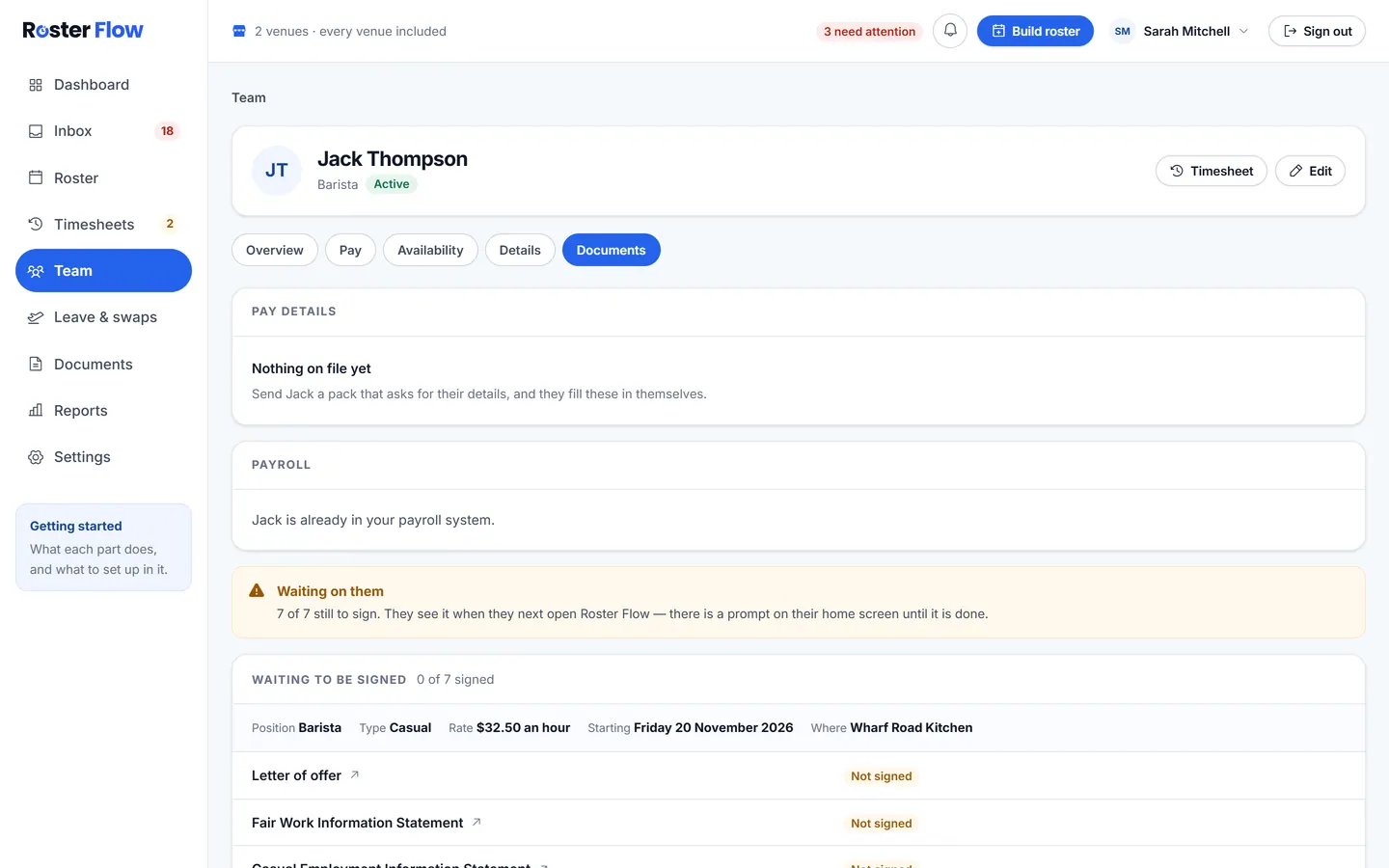
The same tab afterwards: the terms the offer went out on, and what is still unsigned.
When somebody has not got to it
An unsigned pack shows Waiting on them with how much is left. Send a reminder sends one, and only one a day, so pressing it twice because nothing visibly happened does not send two.
Questions
Can I send the offer without the policies?
Yes, and that is the usual way round. Asking for a tax file number and a bank account before somebody has agreed to take the job is asking too early, so the rest is held back and sent once the offer is accepted.
What counts as a signature?
The person types their full name. Roster Flow records that name, the day and time, and keeps it against the exact wording of the document they were shown. There is no drawn signature on either side: your name and title are printed at the foot, above a line to sign by hand.
Who gets a copy of the signed offer?
Both sides. It is emailed to the new starter and to the business on the day it is signed, and it stays on the Documents tab of their profile.
What if I change the pay rate after the offer is signed?
The signed letter does not change. It keeps the terms it went out with, which is the point of signing one. The staff record moves on to the new rate for rostering and payroll.
Next
Still stuck? Tell us what you were trying to do and which screen you were on.