Set weekend and public holiday loadings
The multipliers are your figures, not an award Roster Flow has interpreted. Once you have said what Saturday costs, the roster can estimate a week before you publish it.
Open Settings, then Payroll. Weekend and holiday loadings sits under the pay rates. Only the owner changes these, and they apply at every venue.
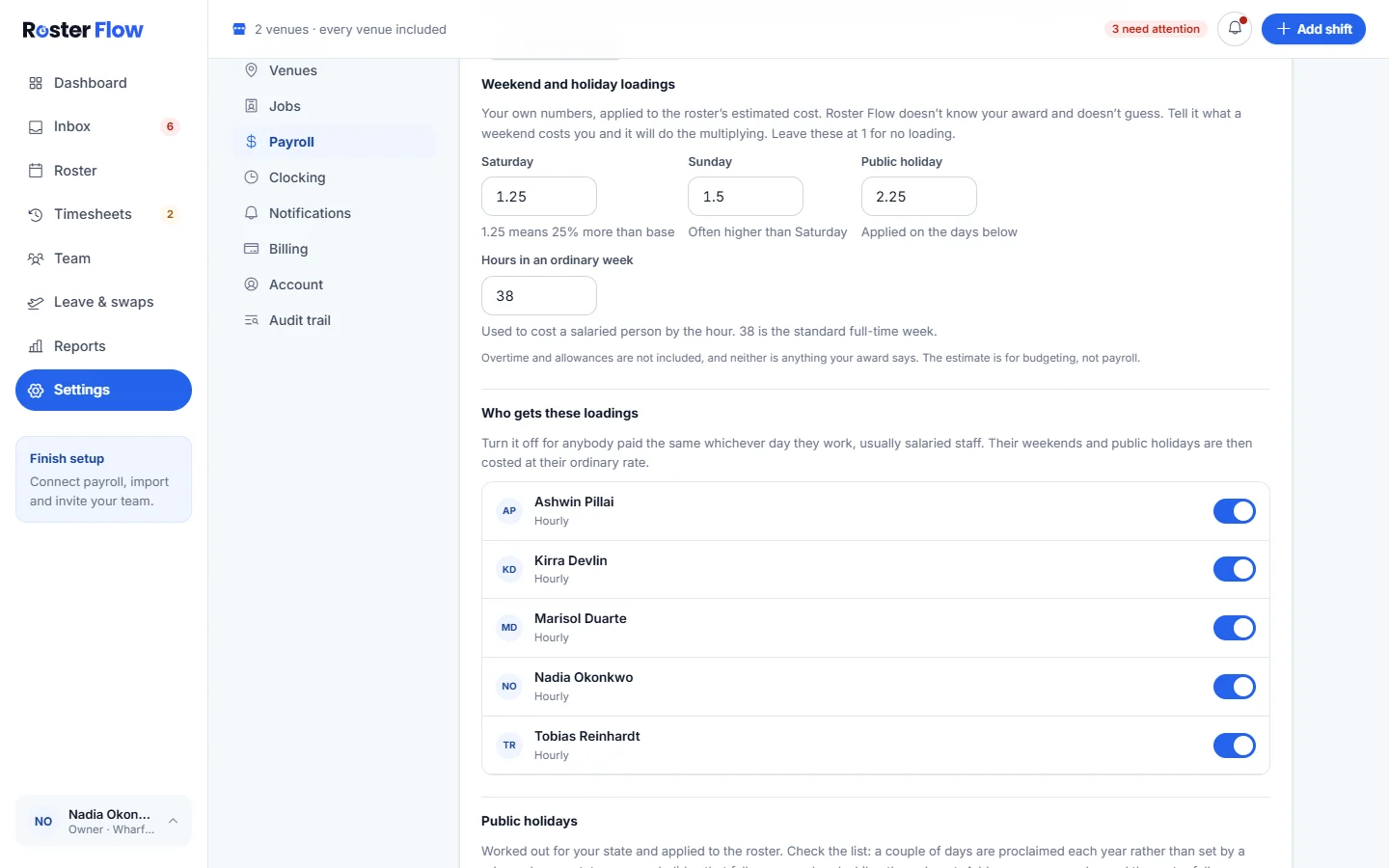
Set the three multipliers
Saturday, Sunday and Public holiday, as a multiple of base. The hint says it plainly: 1.25 means 25% more than base. 1.0 means no loading, which is where every business starts.
Choose which days are holidays
Under Public holidays, pick your State or territory and the dates for the year appear. Tick the ones this business keeps and untick the ones it does not, because they vary by state and by year and the business gets the final say.
Decide who they apply to
Under Who gets these loadings, turn it off for anybody paid the same whichever day they work, usually salaried staff. Their weekends and public holidays are then costed at their ordinary rate.
What the roster does with them
- The week’s Estimated cost of the roster uses them as you build it, so an expensive Sunday is a choice rather than a surprise on the pay run.
- A public holiday beats the weekend. A holiday falling on a Saturday is costed at the holiday figure, because taking the lower of the two would understate the most expensive day of the year.
- Reports shows the same arithmetic against the hours actually worked, under Estimated cost of hours worked.
Where the numbers should come from
Roster Flow does not decide which award covers a venue, and it does not guess. Either take the figures from the award, agreement or contract the business actually operates under and update them when those change, or pick your award in Settings and let the roster cost a week from that award’s own weekend and public holiday columns. Set pay rates and see what a week costs covers the base rates these multiply.
Questions
Does Roster Flow work out penalty rates from my award?
No. It multiplies the base rate by the figure in force, for the days you marked. That figure is yours to set, or it comes from an award’s own table where you have chosen one in Settings. What Roster Flow does not do is decide which award covers a venue, or work out what anybody is owed.
What happens when a public holiday falls on a Saturday?
The public holiday figure is used, not the Saturday one. Taking the lower of the two would understate the most expensive day of the year.
Why are the public holidays for my state wrong?
They vary by state and by year, so the list is yours to edit. Pick your state or territory and tick only the days this business keeps.
Can a manager change the loadings?
No. Loadings, pay rates and the payroll connection are the owner’s, because they apply to the whole business rather than to one venue.
Next
Still stuck? Tell us what you were trying to do and which screen you were on.